

Peacock is NBCUniversal’s streaming service, built to feel like a “TV-first” home base: next-day episodes from major NBCUniversal networks, a big catalog of familiar series, rotating movies, Peacock Originals, and a lineup of live sports and events. If you’ve ever thought, “I just want one app where I can keep up with NBC shows, binge comfort TV, and catch big games without juggling a cable login,” Peacock is designed for that exact person.
At the same time, Peacock can be confusing because it sits at the intersection of broadcast TV, cable brands (like Bravo and USA), and modern streaming expectations (profiles, downloads, “ad-free,” and bundles). People also get tripped up by questions like: Which tier do I need for sports? Can I watch local NBC live? Is “Premium Plus” truly ad-free? Does Peacock work while traveling?
This guide answers all of those—without assuming you already know the Peacock ecosystem. It’s written as a practical, end-to-end article: what Peacock is, what you get, which plan makes sense, what to watch, how sports works, what devices are supported, how bundles can save money, and how to avoid the most common “why isn’t this playing?” headaches.
What is Peacock?
Peacock is a streaming platform owned by NBCUniversal. Think of it as the digital hub for NBCUniversal’s TV universe—NBC, Bravo, USA Network, and other brands—plus films connected to Universal and a range of licensed content. Its identity is different from a service built primarily around global originals or a massive back catalog of prestige dramas. Peacock leans into:
- Current TV viewing: next-day access to many episodes from major networks (depending on rights and the specific show).
- Library comfort TV: widely rewatched series that people binge repeatedly.
- Rotating movies: a mix of studio and licensed films that come and go.
- Original series and specials: exclusives meant to keep subscribers around year-round.
- Live sports and events: one of Peacock’s biggest “must-subscribe” triggers for many households.
Peacock’s sweet spot is the viewer who’s half “I want my everyday TV” and half “I want big moments live.”
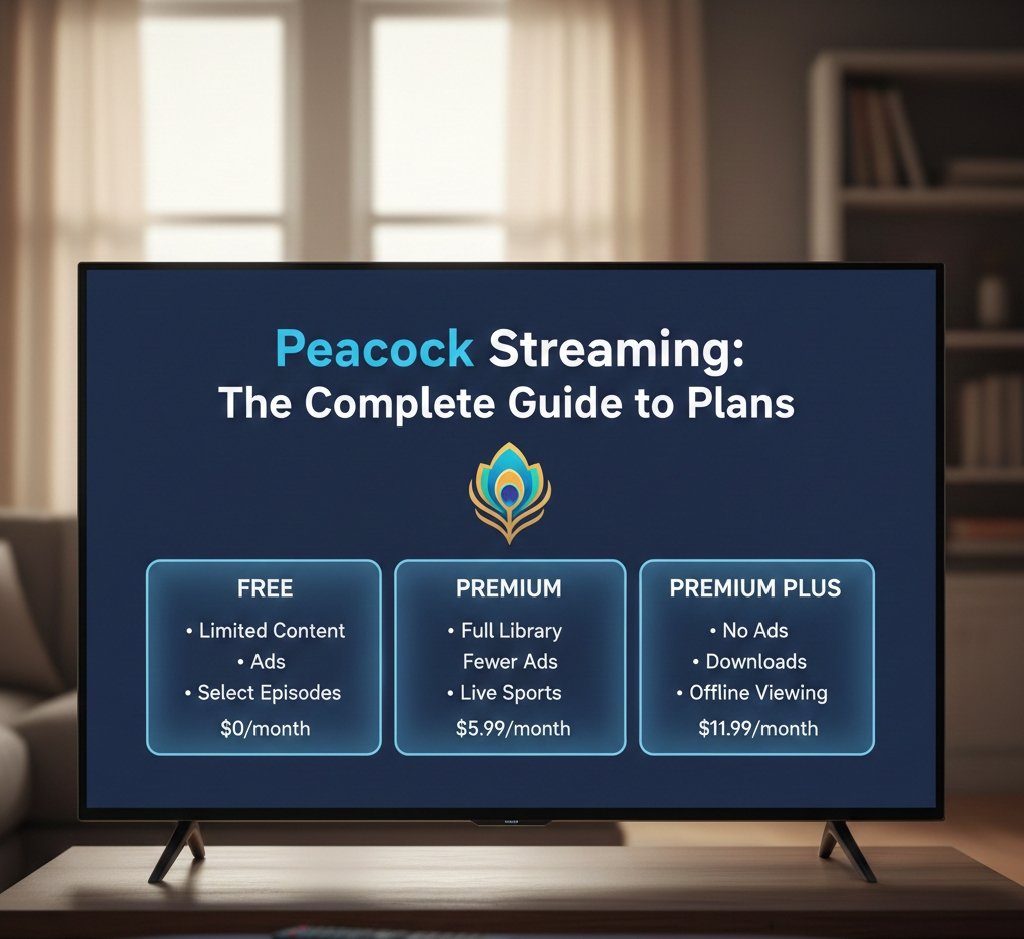
Peacock plans: how tiers usually work (and how to choose)
Peacock’s specific tier names and prices can change over time, so instead of locking you into numbers that might be outdated, here’s the stable, practical way the service is typically structured:
1) Entry tier (lowest cost, more limited)
This tier is built for “keep up with current TV and sample the library.” It commonly includes:
- A selection of current NBC/Bravo-style programming (often next-day)
- A portion of the catalog
- Ads
It may exclude or significantly limit:
- Live sports
- Full originals access
- The broadest movie selection
Best for: people who mainly want next-day episodes and don’t care about live sports or having “everything.”
2) Main tier (the full Peacock experience, ad-supported)
This is usually the “standard” plan that includes:
- The broad content library
- Peacock Originals
- Many major live sports/events that Peacock carries
- Movies (more complete access than entry tier)
- Ads
Best for: most subscribers, especially if sports or Originals matter.
3) Top tier (mostly ad-free + extra perks)
This tier is for people who really dislike ads or want premium functionality. It commonly adds:
- Fewer ads / mostly ad-free viewing (with exceptions—more on that below)
- Offline downloads on mobile devices
- In some cases, live local NBC access (market-dependent and subject to rights)
Best for: travelers, frequent commuters, and anyone who wants downloads or the closest thing to “ad-free Peacock.”
The “ad-free” reality: what “mostly ad-free” usually means
Across streaming, “ad-free” often comes with fine print, and Peacock is no exception. Even on a top-tier plan marketed as ad-free, some content may still include limited advertising or promotional interruptions, for example:
- Live streams (sports, live channels, events) that have ads built into the broadcast
- Certain rights-restricted titles where ad breaks are part of the deal
- Promotional messages for Peacock content
If your main reason to upgrade is “I never want to see an ad again,” set expectations properly: premium tiers generally reduce ads dramatically for on-demand titles, but live content and some special cases can still include ads.
What can you watch on Peacock?
Peacock’s catalog can be understood in five content buckets. If you know which bucket you care about, you’ll instantly know whether Peacock is worth it for you.
1) Next-day TV: NBC and cable brands
This is Peacock’s everyday utility. Many viewers subscribe because it keeps them current with popular weekly shows without needing cable. Next-day availability depends on the network, the show, and licensing terms, but the overall promise is: Peacock is a simple way to keep up with NBCUniversal’s current TV ecosystem.
Who this matters to: anyone who watches network TV as part of their routine and wants to avoid cable logins or DVR.
2) Comfort-library TV (the “always on” catalog)
This is the “leave it on in the background” category: long-running comedies, dramas, procedurals, and reality seasons that can fill evenings for months. Even if you signed up for one tentpole show, this is often the category that quietly keeps Peacock from being canceled.
Who this matters to: binge watchers, rewatchers, and households that want dependable TV without decision fatigue.
3) Movies: rotating studio + licensed selection
Unlike a streaming service that keeps the same movie vault forever, Peacock’s film selection can rotate frequently. Some months feel stacked; other months feel lean. If you care primarily about movies, Peacock is best treated as:
- A service you check periodically for what’s new
- A rotation subscription when the movie lineup is strong
- A complement to another movie-heavy streamer
Who this matters to: movie watchers who don’t mind rotation and enjoy browsing what’s newly added.
4) Peacock Originals: exclusives and franchise plays
Originals are Peacock’s long-term retention strategy. Some originals are designed to be cultural moments; others serve specific fandoms. If you find even one original series you love, it can justify keeping Peacock between sports seasons.
Who this matters to: people who want “something new” rather than only library TV.
5) Live channels and curated streams
Peacock also leans into “turn it on and watch” channels—news, clips, themed programming, and linear-style experiences that mimic traditional TV’s simplicity.
Who this matters to: anyone who misses channel surfing and doesn’t always want to choose a title.
Peacock and live sports: why sports often decides your plan
For a lot of subscribers, Peacock is less about “another library” and more about specific events. Sports are the best example of that.
How sports typically works on Peacock
- You usually need the main tier or top tier for the biggest live sports offerings.
- Sports availability can vary by season, league rights, and your location.
- Some games are exclusive to Peacock; others simulcast with NBC or partner channels.
- Live streams often include broadcast ads even on higher tiers.
The kinds of sports Peacock is known for
Depending on the year and rights packages, Peacock commonly features:
- Major NBC-carried events (where Peacock is the streaming home)
- Soccer coverage (often a big reason fans subscribe)
- Combat sports / sports entertainment (rights-dependent)
- Seasonal events and special live programming
Best practice: If you’re subscribing for one sport or one team, look up the season’s streaming schedule inside Peacock or through official league announcements. Sports rights change, and the “where to watch” answer can shift season-to-season.
Key features: profiles, downloads, captions, and more
Profiles (and why you should set them up immediately)
Profiles keep watch history, continue-watching rows, and recommendations separate. If multiple people share one Peacock account, profiles prevent everyone’s home screen from becoming a chaotic mash-up.
Tip: Create a profile per person and name them clearly. This helps not only with recommendations but also with “Continue Watching” tracking.
Kids profiles and parental controls
If your household includes children, using a kids profile plus maturity settings is the cleanest way to avoid awkward surprises. Parental tools often include:
- Age-appropriate restrictions
- PIN protection to prevent switching profiles
- Control over what ratings appear
Tip: Use a PIN on adult profiles so kids can’t jump over to unrestricted content.
Offline downloads (usually a top-tier feature)
Downloads are a major practical benefit for commuters and travelers. Common rules in streaming apps:
- Downloads are typically available only on mobile devices (phones/tablets)
- Some titles may not be downloadable due to rights
- Downloads can expire after a certain time or if a title leaves the service
Tip: Download the night before a trip and quickly test playback before you leave Wi-Fi.
Subtitles and accessibility
Peacock supports closed captions/subtitles. If captions are out of sync, or not displaying:
- Toggle captions off/on
- Restart the stream
- Check device-level accessibility settings (some platforms override app settings)
Supported devices: where you can stream Peacock
Peacock is broadly available on modern streaming platforms. Common device categories include:
- Streaming sticks/boxes: Roku, Amazon Fire TV, Apple TV, Android TV/Google TV devices
- Smart TVs: many models from major TV brands (support varies by year/model)
- Game consoles: PlayStation and Xbox (support varies by model and region)
- Mobile: iOS and Android
- Web browsers: streaming via desktop/laptop browsers
Practical tip: If Peacock won’t install or keeps crashing, it’s often because the device OS is too old. Streaming apps regularly drop support for older operating systems.
Streaming quality, data usage, and performance tips
Video quality
Peacock typically supports HD streaming, and on some devices/titles may support higher resolutions, depending on:
- Your plan tier
- The specific title
- Device capabilities
- Bandwidth and network stability
If Peacock buffers or looks blurry
Try this checklist:
- Restart the app and device
- Power-cycle your router (unplug 20 seconds)
- If on Wi-Fi, move closer to the router or use Ethernet if possible
- Close other high-bandwidth activities (large downloads, cloud backups, other 4K streams)
- Update the Peacock app
- Check if other apps buffer too (to confirm it’s not your internet)
Data usage note
Streaming can consume significant data, especially on mobile. If you watch on cellular:
- Use Wi-Fi when possible
- Download episodes in advance (if your plan supports it)
- Consider limiting quality through device settings if available
Bundles and “free Peacock”: how people save the most money
Many households get Peacock through partner bundles rather than paying standalone. Depending on promotions and eligibility, Peacock can be included via:
- Retail membership bundles
- Grocery/delivery memberships
- Internet/cable provider offers
- Cross-streaming bundles
How to approach this strategically:
- List what you already pay for (memberships, internet provider, phone plan).
- Check whether Peacock is included with any of them.
- If you can get Peacock included, decide whether you still need to upgrade to the top tier for downloads/ad reduction.
Money-saving tip: If a bundle gives you the standard (ad-supported) tier, upgrade only if you truly need downloads or ad reduction. Many people pay twice without realizing it—once via a bundle and once directly to Peacock.
How to sign up for Peacock (and the cleanest setup flow)
A smooth setup takes five minutes if you do it in this order:
- Create your account on your preferred device (or via web).
- Choose your plan (or redeem a bundle code if you have one).
- Set profiles immediately (adult profiles + kids profile if relevant).
- Turn on parental controls/PIN if needed.
- Install on your primary TV device (Roku/Fire TV/Apple TV/smart TV).
- Sign in everywhere you watch (TV + phone/tablet for downloads).
Tip: Use a password manager. Streaming accounts are constantly being re-logged-in after app updates.
How to cancel Peacock (and what to check before you do)
Canceling is usually straightforward, but people run into two common traps:
Trap #1: You subscribed through a third party
If you subscribed via:
- Apple App Store
- Google Play
- Roku Channel Store
- An internet provider bundle
- A retail membership bundle
…you generally must cancel through that provider, not through Peacock directly.
Trap #2: You have multiple “Peacock sources”
Some households have Peacock through a bundle and separately through an app store subscription. If you cancel one but not the other, you may still be billed.
Cancellation checklist:
- Check your payment method’s statements for who is charging you
- Look at your account settings for “Billing” or “Subscriptions”
- If you subscribed via Apple/Google/Roku, cancel there
- Confirm the cancellation email/receipt
Common Peacock problems (and how to fix them fast)
“Why can’t I watch this? It says upgrade required.”
This usually means the title is restricted to a higher tier (often sports, live streams, or certain exclusives). Fix:
- Confirm which plan you’re on
- Check whether the content requires the main or top tier
- If you have Peacock through a bundle, see which tier it includes
“It worked yesterday, but now I’m logged out.”
Common after app updates or device OS updates. Fix:
- Update app
- Restart device
- Log back in
- If password fails, reset and confirm email
“Subtitles won’t stay on / won’t turn off.”
Captions can be controlled by:
- Peacock app settings
- Device-level accessibility settings
Fix:
- Toggle captions inside the Peacock player
- If it keeps reverting, check system accessibility settings
“Downloads won’t play offline.”
Typical causes:
- You’re not actually offline (weak signal can confuse apps)
- The download expired
- The title left the service
- Your plan doesn’t include downloads
Fix:
- Connect briefly to Wi-Fi, open Peacock, and confirm downloads still exist
- Re-download if necessary
“Peacock isn’t available where I am.”
Peacock availability depends on region, and streaming services often restrict viewing outside the supported area. If you’re traveling internationally, you may not be able to stream normally.
Peacock vs other streaming services: when Peacock is the right pick
Peacock is often the best choice when:
- NBC/Bravo-style weekly TV is core to what you watch
- You care about live events that Peacock streams
- You want a lower-cost add-on service that complements a bigger general streamer
- A bundle includes it, making it effectively a bonus subscription
Peacock may be less satisfying if:
- You mainly want a massive global originals catalog
- You want one service that “has everything” for movies year-round
- International travel access is a must-have
Many households use Peacock best as either:
- A year-round utility (if the TV brands and sports are central), or
- A rotation subscription (activate when a show/sports window hits, pause when it cools off).
Best “value recipes” (realistic ways people use Peacock)
Here are three common setups that tend to maximize value:
Recipe A: “I mostly watch NBC/Bravo shows”
- Choose the entry or main tier (depending on how much you want beyond next-day TV)
- Use profiles for household separation
- Keep Peacock year-round if weekly shows are constant
Recipe B: “I’m here for sports and big live events”
- Choose the main tier or top tier
- Expect ads on live streams
- Treat Peacock as a seasonal subscription if your sport is seasonal
Recipe C: “I travel a lot and hate ads”
- Choose the top tier for downloads
- Download before trips
- Use mobile/tablet as your offline device
Frequently asked questions (FAQ)
Is Peacock free?
Peacock’s free offering has changed over time. In many periods, Peacock has emphasized paid tiers, with limited free access depending on promotions. If you’re looking for free access, the best approach is to check current Peacock offers or bundle eligibility through memberships/providers.
Does Peacock have live TV?
Peacock includes live channels and live events (and sometimes live local NBC depending on tier and market). It’s not the same as a full cable replacement, but it can cover major events and curated “channel-like” viewing.
Can I watch NBC live on Peacock?
Some plan configurations include live local NBC access, but availability can vary by tier, market, and rights.
Can I share my Peacock account?
Most streamers allow multiple profiles and simultaneous streams, but limits depend on the service and plan. If simultaneous streaming is important, test it in your household early and adjust plan/devices accordingly.
Does Peacock have 4K?
Resolution support depends on the device and the specific title. If you care deeply about 4K, test on your exact TV device with a title you know should support higher resolution.
What’s the difference between Peacock Premium and Premium Plus?
Typically:
- Premium = full content with ads
- Premium Plus = reduced ads/mostly ad-free + downloads + potential live NBC perk
The exact benefits can evolve, so always compare the plan feature list at signup.
A complete “What should I do?” decision guide
If you’re still unsure, answer these five questions:
- Do I watch NBC/Bravo-style weekly shows?
- Do I want live sports/events that Peacock carries?
- Do I need offline downloads?
- Will multiple people share this account (profiles/parental controls matter)?
- Can I get Peacock through a bundle I already pay for?
If you answered yes to (1) or (2): Peacock is likely worth it.
If you answered yes to (3): consider the top tier.
If you answered yes to (5): check bundles before paying standalone.
Conclusion: who Peacock is best for
Peacock shines when it’s used the way it’s built: a modern streaming hub for NBCUniversal’s TV ecosystem plus live events. It’s especially valuable if you watch weekly NBC/Bravo-style programming, if specific sports/events are “appointment viewing” for you, or if you can get it through a bundle that makes the cost feel negligible.
If none of that applies, Peacock can still be a great rotation subscription: turn it on when a must-watch season drops or when sports you care about are in full swing, then pause it when your viewing shifts elsewhere.
If you want, I can also format this into a blog-ready layout (meta title, meta description, slug, H2/H3 hierarchy, and internal link suggestions) without changing the content or doing any additional research.
